

Audio often matters more than video for streamers, it’s how you connect with your audience. Bad sounds like noise or muffled voices can make viewers leave, while clear, crisp audio keeps them engaged and makes your content feel professional.
USB microphones offer a simple, plug-and-play solution for high-quality audio recording, podcasting, and streaming without needing an external interface. They work with PCs, Macs, and laptops, let you monitor sound while recording, and are best for solo use or small setups since most are sensitive condenser mics.
XLR mics are professional-grade microphones that need an audio interface or mixer to work. They deliver the best sound quality, very versatile, and great for streaming, music recording, and content creation in studio setups. Unlike USB mics, they give you more control over tone and audio quality but require a bit more equipment and setup.
Lavalier mics are tiny clip-on microphones perfect for vloggers and mobile creators. They give clear audio while you move, can be hidden under clothes, and usually pick up sound from all directions. Wireless or wired, they make on-the-go recording easy and professional.
|
Type |
Best For |
Mobility |
Ease of Use |
Sound Quality |
|
USB Mic |
Beginners, streamers, podcasters |
Low (Fixed setup) |
Plug and play |
Good, clear for voice |
|
XLR Mic |
Pros, studio recording, music |
Low (needs setup) |
Medium (needs interface/mixer) |
Excellent, professional |
|
Lavalier Mic |
Vloggers, interviews, on-the-go recording |
High (wearable) |
Easy to clip-on |
Clear for voice, portable |
|
Mic Type |
Pros |
Cons |
Best For |
|
USB |
Easy plug and play, no extra gear needed, clear sound for voice |
Less flexible than XLR, mostly stationary |
Beginners, streamers, podcasters, home videos |
|
XLR |
Pro-level sound, versatile, studio quality |
Needs audio interface/mixer, more setup, expensive |
Professional streaming, music recording, studio work |
|
Lavalier |
Tiny, wearable, great for movement, clips to clothing |
Picks up background noise, may need receiver |
Vlogging, interviews, on-the-go recording |
A microphone pickup pattern shows the directions a mic captures sound from. Cardioid is front-focused for vocals and podcasts. Omnidirectional picks up all around, great for ambient or moving sound. Bidirectional captures front and back, perfect for interviews. Shotgun is super directional, ideal for video or long-distance recording.
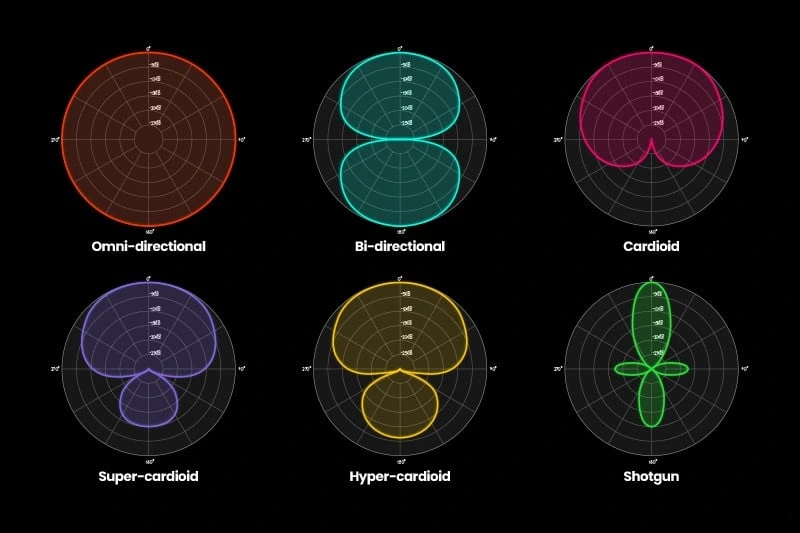
image by Global Audio Visual
|
Pickup Pattern |
Directionality |
Best For |
Notes / Characteristics |
|
Cardioid |
Front-focused |
Vocals, podcasts, live streams, studio recording |
Blocks rear noise, proximity effect increases bass when close |
|
Omnidirectional |
360 degrees |
Ambient sound, lavaliers, choirs, moving sources |
Picks up sound equally from all sides, doesn’t block noise |
|
Bidirectional / Figure-8 |
Front & back |
Interviews, duets, mid-side stereo recording |
Ignores sides, picks front and rear equally |
|
Shotgun (Super/Hypercardioid) |
Narrow front focus |
Video, film, theater, sports broadcasting |
Highly directional, blocks side/rear noise, long-distance pickup |
Noise Reduction - cuts out annoying background sounds like fans, traffic, or keyboard clicks. It makes your recordings sound cleaner and easier to listen to. Some mics have it built-in, while others need extra software. It’s super helpful for streaming, podcasts, or online classes.
Frequency Response - is the range of sounds a mic can pick up, from deep bass to high treble. A wider range means your voice or instruments sound more natural and detailed. If the range is small, some sounds might get lost. Pick the right one depending on what you’re recording.
Pop Filter - A small screen placed in front of your mic that reduces harsh “p” and “b” popping sounds, making your voice smoother and cleaner. Pop filters can be built-in or bought separately and attached in front of the mic, and they’re great for singers, streamers, or anyone recording their voice.
Gain Control - changes how sensitive your mic is. Too high and your sound can get distorted, too low and it will be too quiet. It helps you find the right volume for your voice or instrument. Most setups need good gain control for clear, balanced audio.
Placement - Where you put your mic matters a lot. Keep it close to your mouth but not too close, and avoid pointing it at noisy stuff. The right spot makes your voice sound clear and natural.
Accessories - Things like pop filters, shock mounts, and foam covers can make a huge difference. They help block pops, vibrations, and unwanted noise. Even small accessories can make your recordings sound way more professional.
Software Tweaks - You can also clean up your audio with software. Noise reduction, EQ, and volume adjustments help make your sound crisp and balanced. A little tweak goes a long way, especially for streaming or podcasts.
Good audio is key for keeping viewers engaged. Pick the right mic, use features like noise reduction and pop filters, place it well, and tweak your sound with software. Small changes can make your recordings clear, professional, and way more enjoyable to listen to.











Comments